Showing posts with label Social Networing Tricks. Show all posts

10 Mistakes You're Probably Making On Social Media

Social media can be one of the most effective tools you use to market your website, or it can be a complete waste of your time. I am surprised at how many people I work with that tell me they tried SEO, and it did not work for them. They think that just because it did not work when they tried it, that it is the problem of social media.

10 Mistakes You're Probably Making On Social Media

There are so many mistakes I see made that stop them from becoming successful on social media. I am going to focus on the top 10 that I feel I help people with the most, so you also can see more success on social media.

Mistake 1 - Not interacting with your followers/friends

This is probably one of the most common mistakes that I see. I will visit a profile and see a number of customers, or potential customers, that have left a comment or question that was never responded to.


10 Mistakes You Are Probably Making On Social Media
Or even worse, someone leaving negative feedback that is not resolved. One of the easiest ways to kill your reputation is to have negative feedback. While all of the best brands in the world will have some kind of negative feedback, it is VERY important to respond to those comments. If you can turn an upset visitor into a happy one, there is no better testimonial.


Many times, people forget that social media is just what it says, SOCIAL! You need to socialize and interact with your friends and followers. They want to connect with you personally, and it is your job to make them feel that connection.


Mistake 2 - Too much selling, not enough helping

Just as I previously mentioned, your friends and followers want to personally connect with you. One of the quickest ways to make you feel not personal is to be selling too much.

I am not saying you can never sell something to your friends and followers, but that is not why they followed you.

Your job is to connect with them on a personal level. You need to be posting things that help them. All too often, I see a social media profile filled with posts saying “Click here to get the best deal in the world!”

The truth is, no one is going to pay attention to those if they do not trust you and feel connected. Most your posts should be posts that help your friends and followers, that do not benefit you in any way. I know your product will probably benefit them, but they will not see it that way if there is a price tag tied to it.

One of my favorite things to do is to follow those people I work with and every once in a while I will help them if they have a questions or just check in to see how things are doing. I have people that are constantly sending me messages with their latest accomplishments. Not only does this make me feel good because they are succeeding from my help, but it also shows that they are connected with me. I guarantee that if I were to send a sales message to those people, they will be much more inclined to look at what I am selling.

Mistake Three - You follow people to get a follow back

Your social media profile is not about the number of friends or followers you have, it is about the amount of quality active followers you have.

You can have 10,000 followers on Facebook, but if no one sees your posts or cares about you, they are irrelevant. You need high-quality active followers, and following hundreds of people is the easiest way to get a few people that really do not care about you.

There are two problems I see with this method that so many people use. The first is just what we talked about, that most those followers are not going to be quality followers. The second problem is that it is not hard to see who does this. If someone randomly adds me on Twitter, and I see that they follow five times as many people that follow them, I know exactly how they got these followers.

You need to be focusing on quality connections. This is just going to be a waste of time and could get you banned on many social media platforms.

Mistake Four - Not scheduling your posts


If you are not careful, social media can take up all your time. No one has the time to spend all day on social media to be posting to their followers. The problem is, you need to be able to send updates throughout the day.
10 Mistakes You Are Probably Making On Social Media
That's where post scheduling tools come in. You can sit down and create all your post for a few days and schedule them to go out at different times through the week. Then you sit back, and let your social media work.


Not only will this free up your time as you are not sending updates all day, but it will help you do all your social media posts in a single sitting and be much more effective with your time.

As you are building your business, time is the most valuable asset. The more time you have, the more successful you can be.

The two tools that I suggest for scheduling your posts are Buffer or Hootsuite. Each of them have different advantages. Buffer is better at scheduling posts, while Hootsuite makes monitoring all your social media profiles in one place, simple. I use both but spend most my time on Hootsuite to interact with people.

Mistake Five - Posting at the wrong times

One of the biggest mistakes you can make is to post at the wrong times. You could have the most amazing posts, but if no one sees them, it will not matter how great they are.

You need to be selective about the times you are posting. Each social media platform has different types of people and different peak times.

Mistake Six - Paying for followers

This one is similar to following to get followers, but please do not pay for followers. There are places out there that you can follow someone for points, and then you can give those points to someone else to follow you.

The downside to this is obvious. Not only are those going to be very low quality followers, but most of those are not even real accounts by real people. You are just wasting all your time and money by doing this.


When I am trying to find influencers in my industry (People I want to work with to help grow my business), I search their social media authority. If you have thousands of bad accounts following you, your social media authority is going to be VERY small and those that use it will not consider you an influencer or want to work with you.

10 Mistakes You Are Probably Making On Social Media

Now, not to sound like a hypocrite but I believe there is one time when this would be OK. When you are starting off on social media you are not going to have any follower or friends. I do suggest using a tool like this to grow your first 100 followers so you do not look like you are insignificant.

Yes it is true those followers are not going to turn into anything, but I know when someone wants to work with me and only has 3 followers, I am much more likely to decline. They are not able to help you if they do not have an audience for you to work with.

100 seems to be a good number as it will look much better, and 100 bad followers is not going to hurt you. As you grow your authority, you are going to start to get spam followers regardless. The number is small enough that it will help you with visual authority, much more then it will hurt you in page authority.

Mistake Seven - You're boring

Have you ever gone to a movie and left halfway through just because the movie was so bad? It did most of the right things. It made the movie, marketed it, sold you a ticket… but it was not even worth the $8 you spent to finish the movie.

10 Mistakes You Are Probably Making On Social Media
This is what many people do. They will do the marketing and get a good quality following, and then they do not post anything that keeps the readers attention.

Just like you in the movie, your readers are sure to leave early and unfollow you.

You need to have some personality in your posts. Give them information that will help them and applies to them. If you have people following you that like motorcycles, don't ask them for parenting tips when your baby is crying. There might be one person out there that can help you, but most will hate the post.

One great way to not be boring is to motivate people or make them laugh. If you look at viral videos, most of them are videos that educate masses, newsbreaks, or something that makes you laugh.

Now, I can’t tell you how to be funny, but I can tell you how not to be boring.


Mistake Eight - Not completing your profile page

We are pre-programmed to see spam accounts. One of the easiest ways to detect a spam account is they do not take the time to complete the profile. Having an incomplete profile is one of the easiest ways to show that you are not important.

While the whole profile is important, the worse thing you can do is not even have a profile picture. A profile picture shows who you are and makes the visitor feel like they know who they are talking to. Having the default gravatar is sure to stop people from following you in the first place.

Mistake Nine - Using too many hashtags

Hashtags are a tool that let you set a category for your posts. You can type a # and then a word and if you click that hashtag it will show you anyone that has used that hashtag.

10 Mistakes You Are Probably Making On Social Media
Hashtags are a great tool, but there are two main problems that I see when people are using them. First, they use too many of them, or second, they use them incorrectly.

When using hashtags, you want to make sure you do not post so many of them that your post looks like it is all hashtags. I generally recommend using one or two hashtags per post.

You want to make sure your hashtags are not too long. You do not want a hashtag that is really long. For two reason, it makes your post look more like spam, but most importantly, you want to use hashtags that everyone else is using.

If no one else in the world has used that hashtag then no one is going to be clicking on it to see your post. Make sure you keep it short, and use hashtags that you believe to be common.


Mistake Ten - Talking negatively about others

This is one of the quickest ways to lose credibility. When you talk bad about others, you put out a negative vibe to your followers. Many of those followers are people that you might work with in the future. If you post a lot of negativity, it will be hard to connect with people. Post positive, happy, uplifting posts.


We all have negative things happen to us, but we need to keep those off social media.

Just recently, I wrote a post about why I did not like a service. I had good reason why and thought that people should know about the service before they get into it. My intention was not to write bad about it, but to show a site that might not be the best for everyone.

10 Mistakes You Are Probably Making On Social MediaNot too long after I posted it, I was talking to some people in my industry that I was going to guest post for. One of them wrote back and told me that the post was a bad post and it was the main reason he did not want to work with me.

Apparently, he loved the service and was offended when I mentioned something I did not like about it. Even though I was not intending to talk negatively, that is how it was taken, and I lost out on that opportunity to gain new fans.

I went back and wrote it again, and instead of talking about what I do not like about that service, I talked about what I liked of the service that I would recommend and removed the negative parts. Not only have I not had issues, but the amount of shares from it was much higher as well.

continue reading 10 Mistakes You're Probably Making On Social Media

Code to Invite All Facebook Friends With A Single Click 2014

Hi friends, I'm back with yet another Facebook trick. This trick is to invite all your Facebook friends to an event or to go like your page.


We know Facebook is the best way to promote any kind of event or any page,  we all create different  pages and events on Facebook but the problem we face is that we don't get enough members or likes.  So we invite all our friends one by one,  but again this is not easy as inviting all your friends one by one will take a  large amount of time.

To save this time which people waste on inviting their  friends I have come up with some scripts. There are some more codes and scripts available on net but those does not work now as Facebook has changed its layout. This trick is latest 2014 edition code without any problem.  Now lets get started.

Note that this works only on Google Chrome browser.


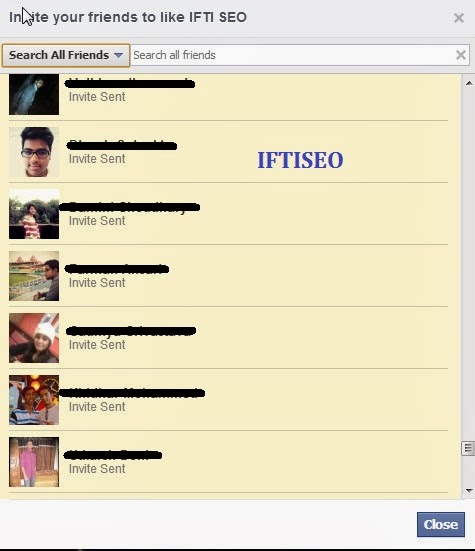
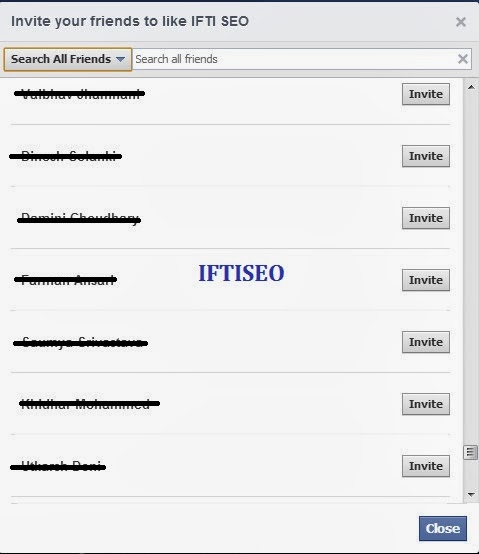
1. First of all open the page where you want to invite all your friends.  Open invite friends option,  a popup  opens. 


2. Now press F12 on your keyboard.  Chrome console window opens.


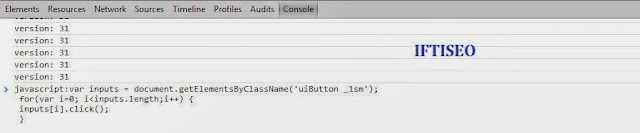
3. Now copy the code given below and paste it in the console window. Press enter. For page invites use the page code and for event invites use the event code given below

Code to Invite All Facebook Friends With A Single Click 2014


FOR PAGES
 var inputs = document.getElementsByClassName('uiButton _1sm'); for(var i=0; i<inputs.length;i++) { inputs[i].click(); }

FOR EVENT 
 javascript:elms=document.getElementsByName("checkableitems[]");for (i=0;i<elms.length;i++){if (elms[i].type="checkbox" )elms[i].click()}

NOTE: When you copy the above code, our link will also be copied so make sure to remove the link before executing the code in the console window.


It will automatically invite all your friends to your page with just a single click. If you have a long list of friends then this may utilize more time and the page may look unresponsive for some seconds. You can use this code to invite all your friends to any page or event, and it does not come in spamming so don't worry, Facebook won't do anything with your account.


Wasn't  that easy.  I hope you liked it and utilize it to max extent. Share this with your friends and others. MORE FACEBOOK TRICKS Leave a comment below if the code doesn't work, we will change the script. 
continue reading Code to Invite All Facebook Friends With A Single Click 2014

Code to Add All Friends To Facebook Group 2014

Hi Friends, Its been quite a while that I haven't posted anything here on IFTISEO due to my busy schedule, but today I have managed some time to post a trick. A trick which will be really helpful to many SMM experts.

Code to Add All Friends To Facebook Group 2014


Have you ever created a Facebook group, well most of us have tried it but the problem we face is that we can't get many members to it. 

So in this post I will be sharing the code to add all your Facebook Friends to any group either it may be your's or it may not be. This code will simply add everyone without even their permission. On one hand it may be irritating for others but on the other hand (that's yours) it will be quite helpful.

Before Reading this trick I would Like you all to also check out our recent post to Invite All Friends to any Facebook page New LAYOUT.

There are many extensions of Chrome which offer the same, but we would not recommend those as most of them not just add friends to a group but also tries to spam your profile in one way or the other.

Note: Use Google Chrome Browser for it.


Follow the steps to Add All Friends to Any Facebook Group:

  • Open the Facebook group where you want to add all your Facebook Friends. Note down the number of members in the group. 
  • Press F12 Button to open up Developers Window.
  • Select Console Window. 
  • Copy the Code from HERE and paste it in console window. Press Enter and wait for 10-20 Seconds. (If your friend list is long then it might take some 2-3 minutes) 
  • Now All your Friends will be added to the Group. You may confirm it by noting down the total members of the group.


Code to Add All Friends To Facebook Group 2014 Last Update: 7th March 2014.

So wasn't it easy. Use this code whenever you want to add all friends on any group. This code will be updated regularly and is 100% safe. 

Don't misuse this code to spam others, Use it wisely. Share this trick with your friends and leave a comment below if you need any further help.

continue reading Code to Add All Friends To Facebook Group 2014

How To Create A Facebook Page Without Name 2014

Its again a long time since I posted some common trick that can attract any person other than bloggers, so I have decided to come up with some such trick. 

How To Create A Facebook Page Without Name 2014
Create A Facebook Page Without Name 

You all have must have seen Facebook pages without name or Facebook profiles without name or sometimes even empty status and comments, So today I will be sharing all these tricks in this post. 


The best part of these pages or profiles is that everyone attracts towards it, I myself have liked many pages with no name. So lets unroll the method.

If you want to make a new page with no name or if you already have a page and would like to have no name on it then follow the steps :


Create A Facebook Page Without Name 2014

  • Create a Facebook Page with any name of your choice and category, I prefer Cause - Community category. You can use the Code now also but its better to use it later on. If you want to apply this trick on any of your existing page then simply follow the steps from hereby. 
  • After you have created the page all you have to do is open the page as admin and go to the Page settings.
  • Now all you have to do is rename the page. 
 iٌٌٌٌَُُftiseo   ٌٌٌٌَُُ
Create A Facebook Page Without Name 2014
This will come when you will paste it on your address bar.

Create A Facebook Page Without Name 2014
Use this code


  1. Just Copy the above code and first paste in your address bar. Remove "iftiseo" and copy the code again. Now you have the code to have a page without name. See the picture if you have any doubt.
    Create A Facebook Page Without Name 2014
    Paste the code here and save it
  •  Just Click on Change page name and paste the code youv'e copied earlier. (The one without IFTISEO) and click save. The box will look empty so don't worry, just click the save changes button.
  • Your page is now without any name. See Demo of one of my page that I created using this trick

Additional Tricks: 


1. Post an empty Status
Just copy the code given above and paste it in the status box and post it. You have just posted an empty status.

2. Facebook Profile with No Name
Use the same code as your name and you will be having a profile with no name. (I haven't tried it yet as we have only 3-5 chances of changing our Facebook name.) If you try it, do let us know about it in the comment sections.

3. Empty Comment
The same code works for empty comments as well. Just paste in the comment box and press enter.

I have explained this trick more very very briefly but still if you find any difficulties do let us know.
I hope you liked this post. Do share it with your friends, coz sharing is caring and it encourages us write more tips and tutorials.  


continue reading How To Create A Facebook Page Without Name 2014

How to Get Instant Traffic from StumbleUpon on Your Site

Hi, friends today I'm bringing you a premium method to get instant traffic via StumbleUpon. As a newbie, my blog doesn't receive much traffic and this problem is same with almost every new blogger. So I frequently search on the internet on how to get high traffic on my blog and other websites. Last week while searching about the same, I came across a video named " How I got my traffic doubled in 1 day ". As usual such videos attracts and I watched the video and followed the steps. 

Within no time I had a boost in my traffic and I was like Woah that's it I've cracked a code. When I did some further research on it, like checking who all from my Facebook friends are on it, the result was amazing. I saw only top bloggers on it, and they indeed made a good reputation on it by sharing their blog posts. This made me sure that StubleUpon is one big source of traffic for them. 


Before knowing how it actually works, I would like to tell all newbies about StumbleUpon. StumbleUpon is basically a Discover Engine that recommends interest specific web content to the users. It is a social network with millions of members where people share web content, photos or videos. It has a very broad list of categories allowing us to find pages and sites of our interest.

Now the question arises, How to Get Instant Traffic from StumbleUpon ??? 
Well its really simple and everyone can easily take advantage of it to get the maximum out of it. 

Firstly, Signup at StumbleUpon.com. After signing up it will ask you to select your areas of interest, Don't fill randomly as it an important part. Once you have completed with all your profile related activities, it will lead you to your interest related contents, you can like, dislike or stumble those pages. In this way you may find some really interesting tricks, topics and other content. 

Now its time to add your page and content so that other users find your website too.  Login to your account and go to Submit. Here you can submit your post easily as shown below. Just fill the details accurately and submit it.


Once you submit your post, open up your Analytics and boom. You will be having around 20-50 views on your post. The more likes you get to your post on StumbleUpon the more it will be shared to others. So this way you get Instant Traffic on your Site or blog


It is not necessary to always go to the link and submit your post, you can easily submit by using a StumbleUpon social widget or even a toolbar having StumbleUpon button. 


Some tips that may help you get more exposure:

  • Follow all your friends and other people of your interests, this way you will also get followed by them.
  • Submit a single post not more than 3 times.
  • Make sure to submit post according to the category, selecting wrong category may not help.
  • Thumbs up all those posts that you like. 
  • Make lists so that, you can have your posts arranged accordingly.  


continue reading How to Get Instant Traffic from StumbleUpon on Your Site

How to Share Your Post to All Facebook Groups By A Single Click

Once you publish a post on your blog or website all you need to do is to expose it and the best way is by sharing it on social networks and other social bookmarking sites. Out of all one of the best source for getting traffic to your new blog post is ?? Is from Facebook Groups. :) 

So the question now arises. Have you joined Blogging Facebook groups or other FB groups of your Niche ? Do you share your posts on them ?  How much time does it takes to share your post on all fb groups manually ? 

How to Share Your Post to All Facebook Groups By A Single Click


I know it takes a lot of time. What if I share with you a method which I use and it takes me only 5 minutes to share my post in more than 70 groups. Yes its completely free, easy and safe. Its not like other methods where you have to login with your Facebook ID and then post, Its also not like collecting all the Facebook group ID's and then mailing on them. ( You will find this method everywhere on net ). So today I have come up with this post on my reader's request.

Steps to Follow: 


  • Firstly install a social sharing widget on your blog. We use ShareThis widget for blogger. Make sure you add the Facebook SEND button on it. 
  • After Installing the sharing widget open up any post of your blog and scroll down at the end of the post. It should look as shown below.
Sharethis widget

  • Now you are done, just click on SEND button and a drop down lists will come showing your friend list and your groups. Just type anything relevant to your post in the message box and select all your groups in recipients as shown below. 
Post to All Facebook Groups By A Single Click

  • After selecting all your groups just click the send button. It will now automatically post to all the selected groups. To confirm, just go to the activity log on your facebook profile and you can see all your posts. 


Some Important Notes

  • You can use any social sharing widget which allows you to put FB send button. 
  • Select a max of 50 groups at a time to avoid being caught by facebook. 

This trick will surely save your time. Share this with your friends and other bloggers. If you have any problem installing the widget, feel free to comment below or contact us.

continue reading How to Share Your Post to All Facebook Groups By A Single Click

How to Invite All Facebook Friends in New Page Layout

Hi there, after some amazing posts on blogging and Social media I'm back with a tutorial post. This post will allow you to invite all of your friends to any facebook page. You might be thinking that I posted the same thing before too?? Yes its posted before and the code is still the same but there's a change, A change in Facebook Page Layout. Facebook changed its page layout recently and thus due to this reason many people are not able to use the old technique. So in this post I will share the step by step guide on how to invite your friends to new facebook layout pages. 

How to Invite All Facebook Friends in New Page Layout

We all make facebook pages no matter on what topic it is. We make pages for our blog, website, brand, public figure or we even make pages for fun. So is making pages enough???

Obviously no!! You will have to get likes on your page so that your target audience can get your posts and updates. But wait!!! It is not that easy to get likes, so what I and most of us do is just invite all of our friends to LIKE our FACEBOOK Page. In this way our friends get a notification and there is a 50% chance that they will open up your page and like it.


But wait again!! Will you invite all your friends manually ?? I mean won't it take time ?? In hours ?? So to overcome this time problem we have come up with a simple code that will automatically invite all your friends to like your page with a singe click. 

Lets get started!!

Code to Invite All Facebook Friends in New Page Layout 2015

Just Follow the given steps: 

  • Firstly as usual, open the page for which you want to send invites to your friends. 
  • If you are the admin of the page you will see an option "BUILD  AUDIENCE", Click on it. 
Code to Invite All Facebook Friends in New Page Layout

  • Click on Invite Friends, a pop will open containing a list of all your facebook friends. Scroll the List as much as you can so that all of your friends get listed in it.
Code to Invite All Facebook Friends in New Page Layout

  • Now follow the same old method. Press F12 on your keyboard. Console window opens in case of Mozilla and Chrome. 
  • Copy the code given Below and hit the enter button. All of your friends will be invited automatically. 
How to Invite All Facebook Friends in New Page Layout
 var inputs = document.getElementsByClassName('uiButton _1sm'); for(var i=0; i<inputs.length;i++) { inputs[i].click(); } 

Code to Invite All Facebook Friends in New Page Layout  
  • This process can take upto 2 minutes depending upon the number of friends you have. Also note that our blog link gets copied along with the code, so before hitting the enter button make sure you remove our link.


Isn't it Simple!! Well I still posted as I got many comments on my previous post about how to make it work with the new layout and instead of updating the old one, I thought of just writing once again. I hope this will help you. Do share this tutorial with everyone who is still facing problems inviting their friends on their fb pages. 

continue reading How to Invite All Facebook Friends in New Page Layout